
THE EXPERIENCE
Turn OBS replay clips into an interactive on-stream replay player.
A complete multi-platform clipping and catalog system for your replays.
Capture [[blue:OBS Replay Buffer]] clips and play them through a [[blue:Streamer.bot]] controlled browser overlay.\nA complete clip management system with a [[blue:fully featured catalog]], search, ratings and playlists. Capture and play clips from [[blue:OBS]], [[purple:Twitch]], [[red:YouTube]] and [[green:Kick]] platforms.\n manage your clip library, and control playback directly from chat with over [[blue:39 commands]] across all supported platforms. The Settings interface provides control over [[blue:colours]], [[blue:layout]], [[blue:behaviour]] of playback, playlists, messages and presentation. Using the [[yellow:RTS Position Editor]], you can position and animate the [[blue:Player]], [[blue:Panels]] and [[blue:Messages]] anywhere on your overlay.
A complete multi-platform clipping and catalog system for your replays.
Import the [[blue:Streamer.bot]] actions, enable them, configure OBS Replay Buffer and the local HTTP file mapping, add the overlay to OBS, then test Action Replay.
Open [[blue:Streamer.bot]] and use Import to paste the supplied import string, or download the latest import file and import it into [[blue:Streamer.bot]].
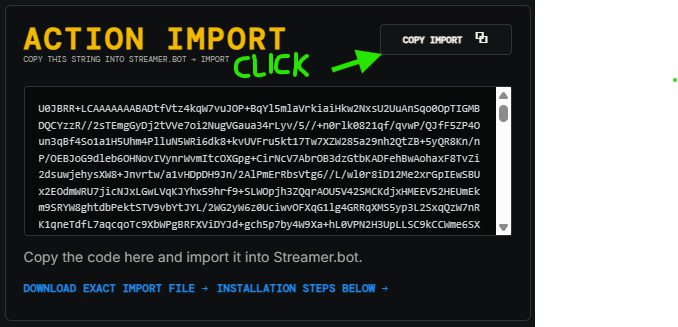
Look above for Action Import, click the Copy Import button, then paste the import code into [[blue:Streamer.bot's]] Import dialog.
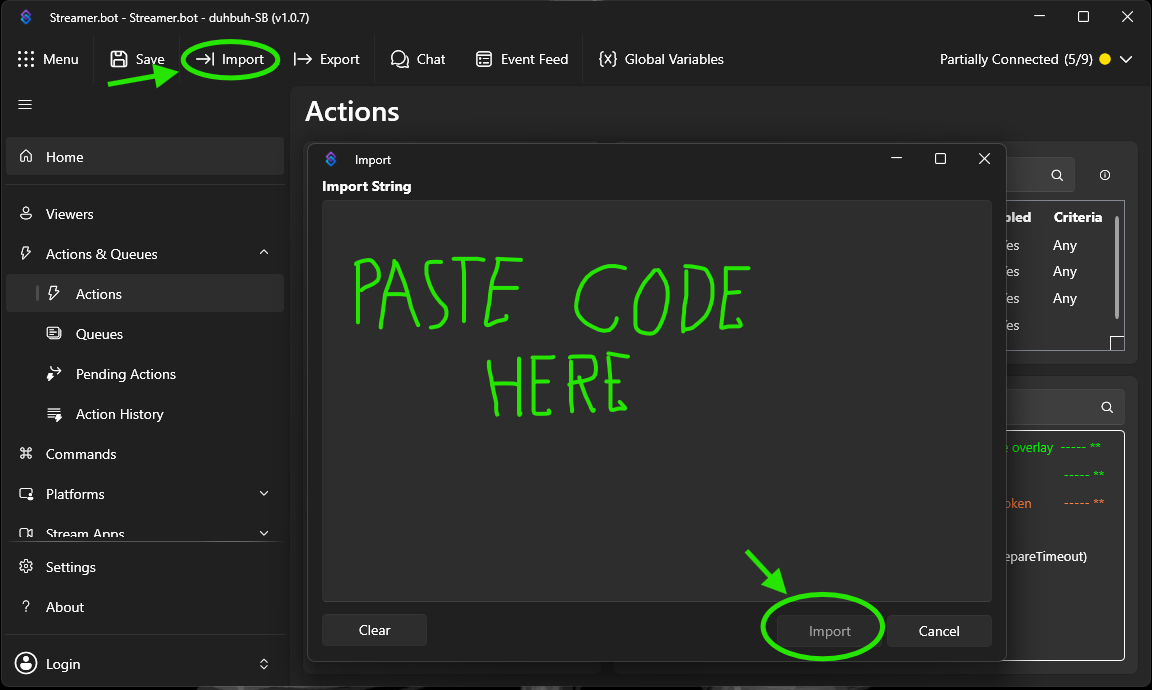
Select Import from the [[blue:Streamer.bot]] toolbar.
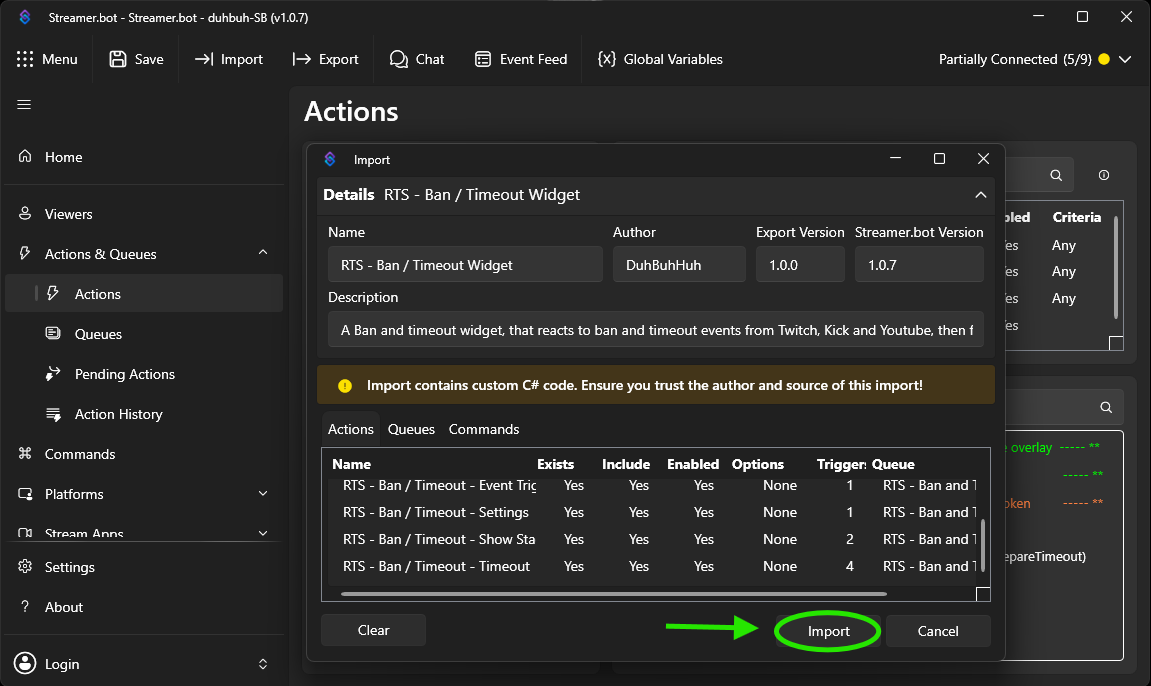
Paste the supplied import string into the Import String box, then select Import.
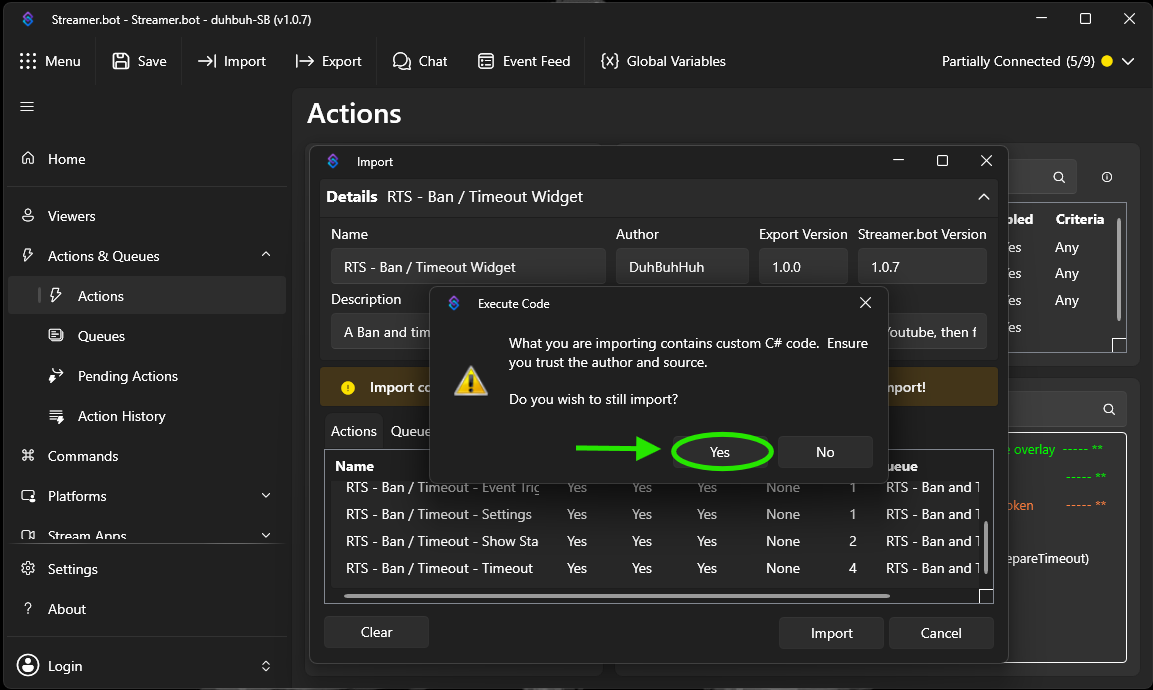
Review the actions being imported, then select Import to continue.
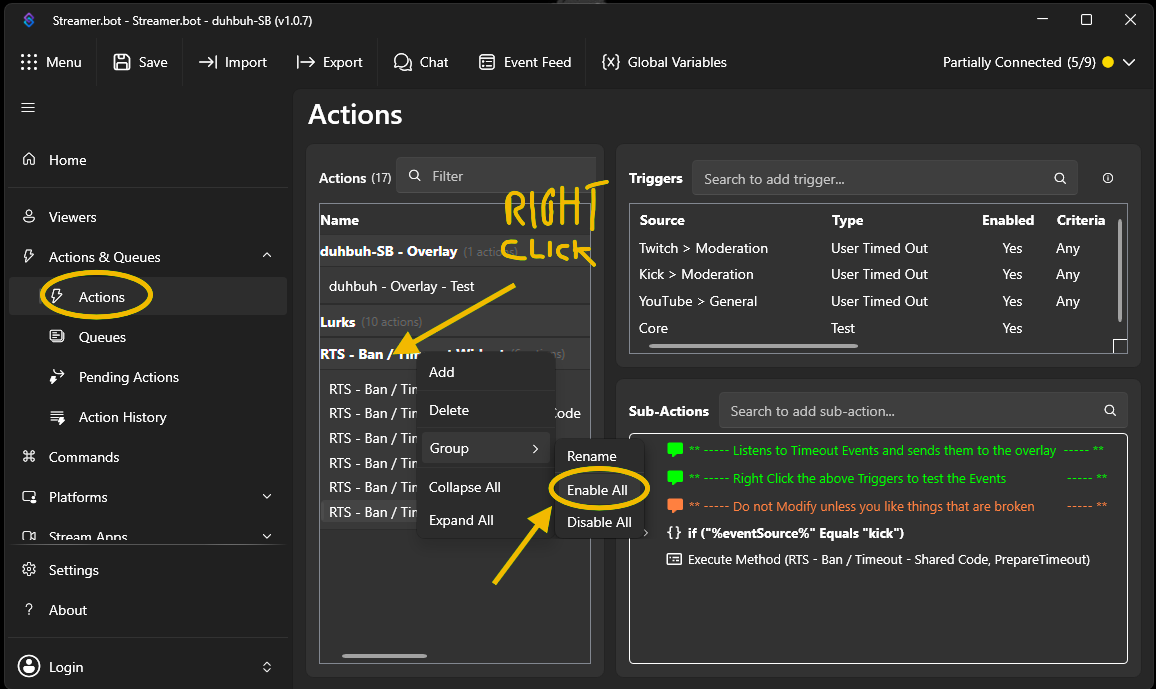
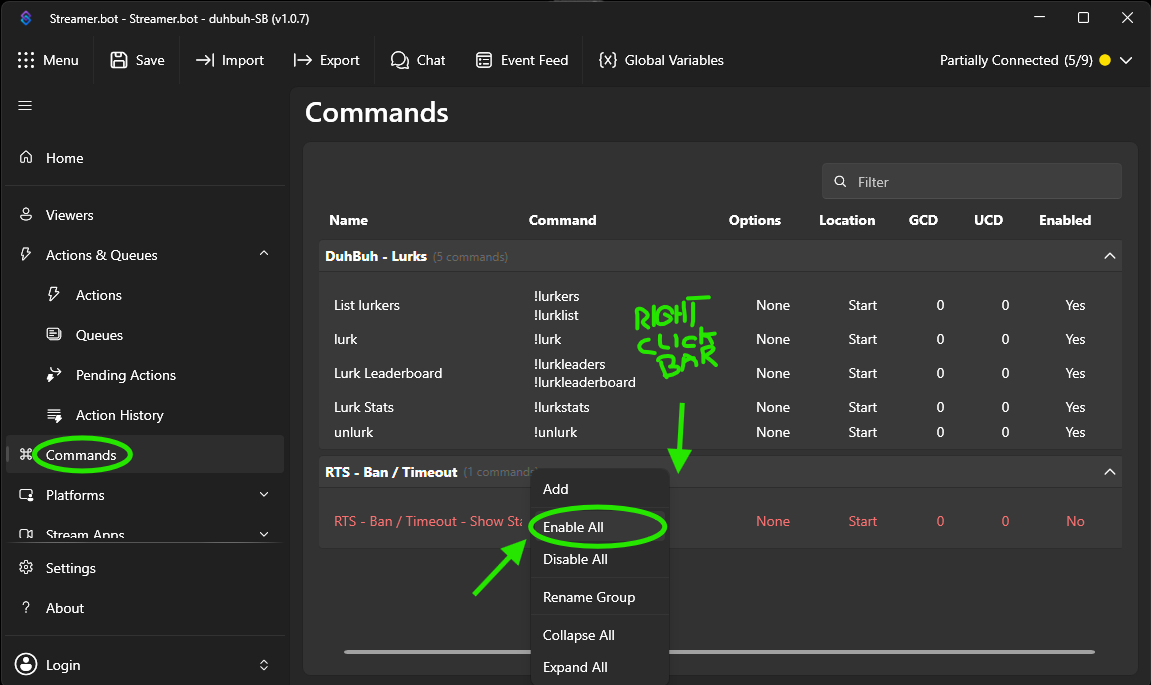
Enable the imported RTS Action Replay actions and commands so the extension can respond to events and chat commands.
Enable the imported RTS Action Replay actions in [[blue:Streamer.bot]].
Confirm the imported RTS Action Replay commands are present and enabled where required.
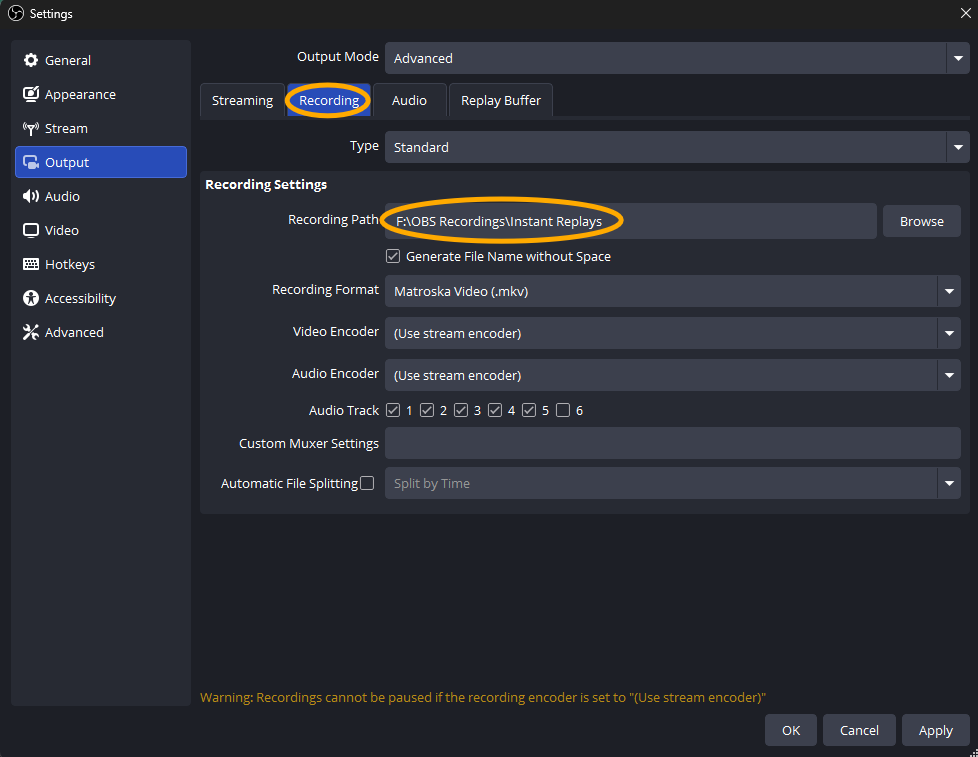
If you want to enable capturing of local files created by the OBS Replay Buffer, choose the folder where the replay files are saved.
In OBS, open Settings > Output and enable Replay Buffer.
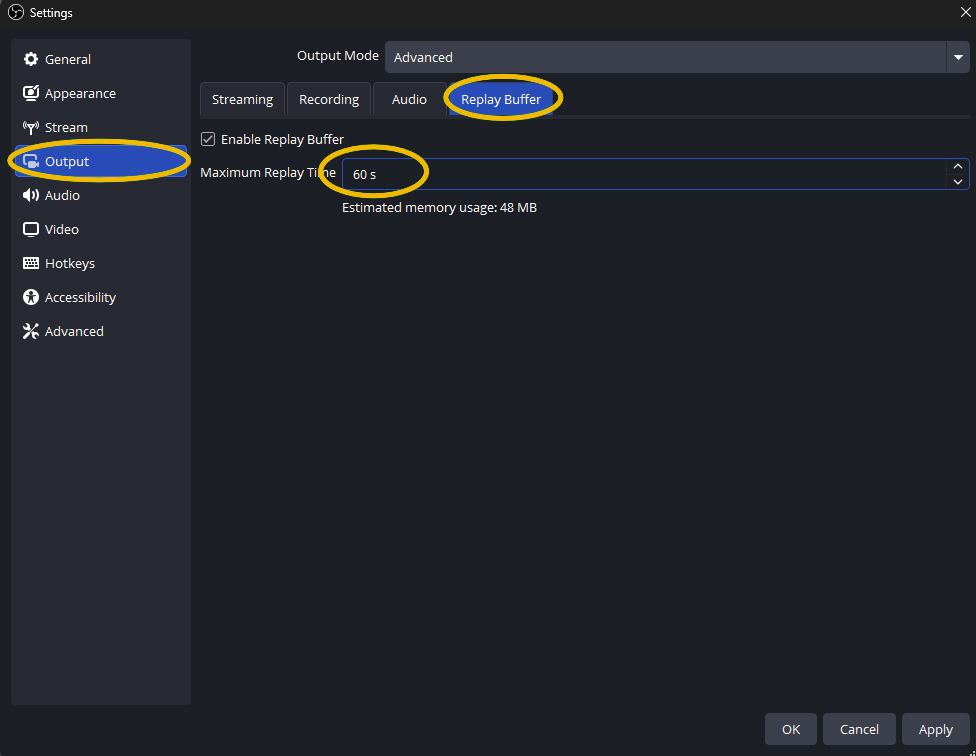
Configure OBS to save replay files to a folder that [[blue:Streamer.bot]] can access. You will use this same folder when configuring the HTTP Server mapping and RTS Action Replay settings.
The hosted RTS overlay cannot read files directly from your computer. [[blue:Streamer.bot's]] HTTP Server provides the local URL that the overlay uses to load replay video files.
In [[blue:Streamer.bot]], open the Servers or Web Server settings and enable the HTTP Server. Keep note of the HTTP port.
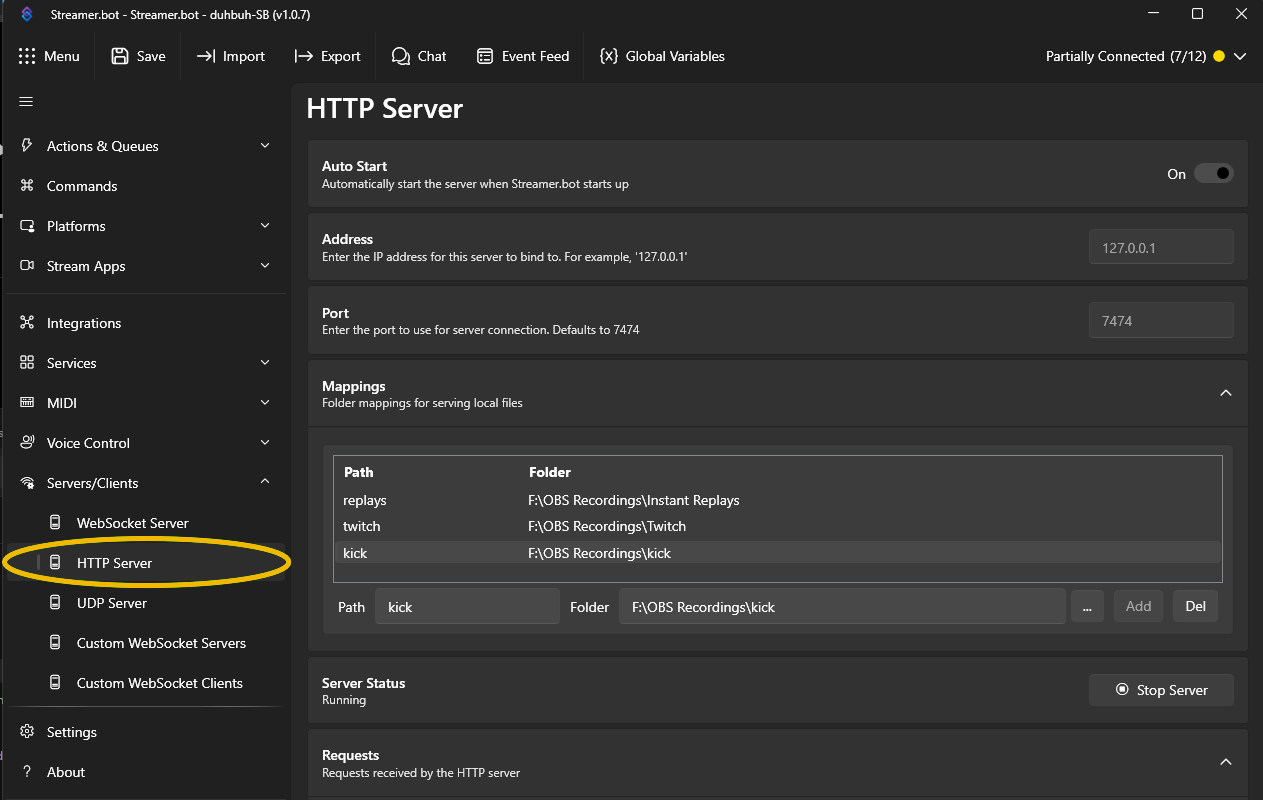
Create a file or directory mapping for the OBS Replay Buffer folder. Use a simple URL path such as [[code:replays]] and point it to the same local folder where OBS saves replay files.\nIf you want to save Twitch and Kick clips locally, add a mapping for those too. The mapping should point to the folder you set up in the extension settings for Twitch and Kick.
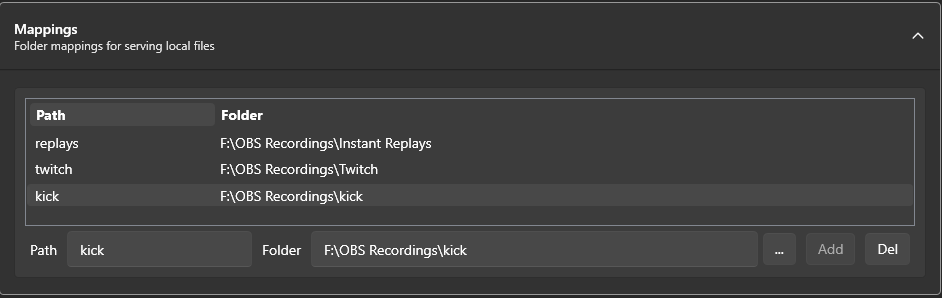
Leave the [[blue:Streamer.bot]] HTTP Server running while using Action Replay. The overlay uses this service to request the local replay video. It's recommended to turn on the toggle at the top of the HTTP settings to have the HTTP server auto-start on launch.
The hosted overlay uses the [[blue:Streamer.bot]] WebSocket to receive Action Replay events and commands.
In [[blue:Streamer.bot]], open the WebSocket Server settings and enable the server. Keep the configured port available to the overlay.
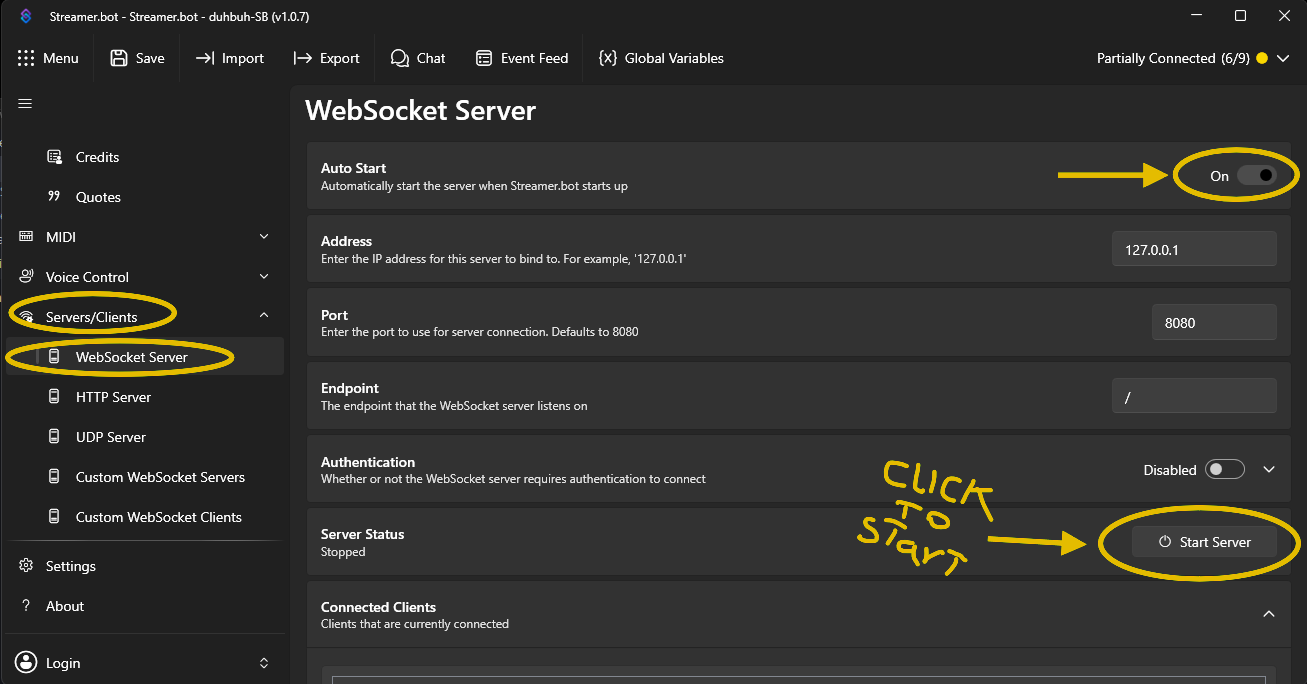
The [[blue:Streamer.bot]] WebSocket Server must remain running while the Action Replay overlay is in use. It's recommended to turn on the toggle at the top of the WebSocket settings to have the WebSocket server auto-start on launch.
Add the Action Replay hosted overlay as an OBS Browser Source, or use the supplied local overlay files.
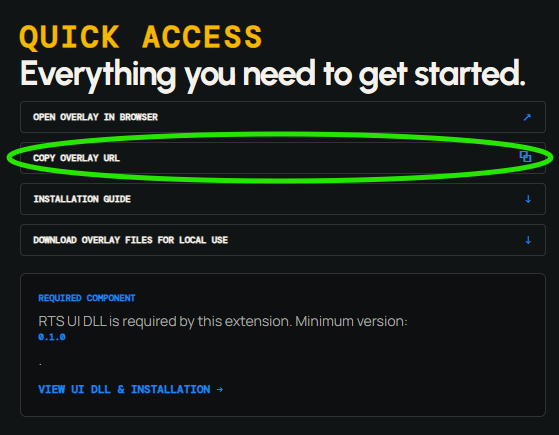
Look above in the Quick Access section and click the Copy Overlay URL button. This copies the overlay URL to your clipboard for use in OBS.
Add a Browser Source to an existing or newly created scene in OBS.
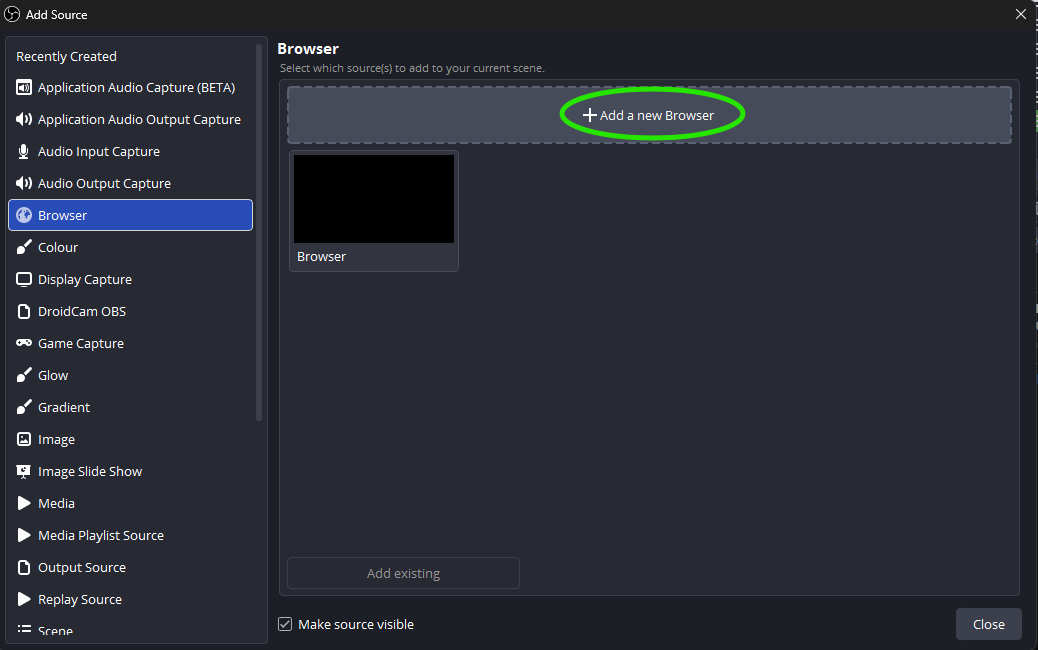
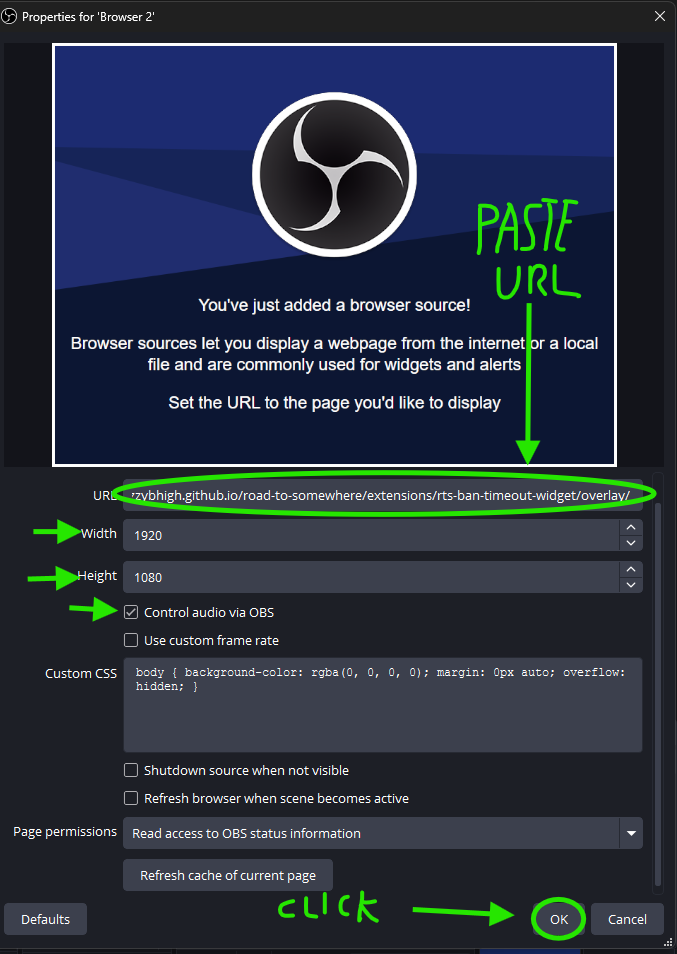
Paste the Overlay URL you just copied into the URL field, then set the width and height to 1920x1080 or another 16:9 size. The Action Replay overlay uses a 1920x1080 coordinate system. Enable Refresh browser when scene becomes active if required by your scene setup.
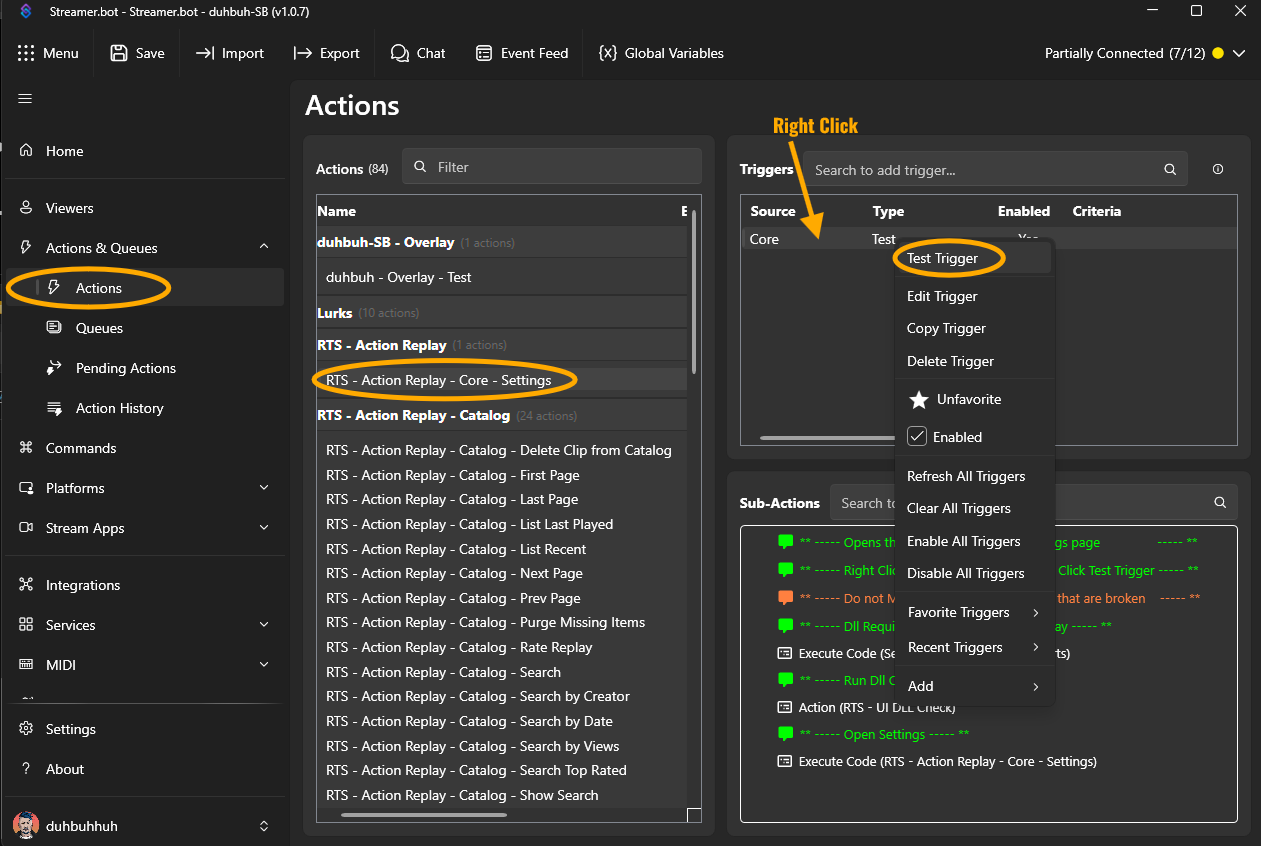
Open the RTS Action Replay settings and configure the extension.
In the [[blue:Streamer.bot]] Actions panel, look for RTS Action Replay settings action to open the extension settings. The settings are fully documented below in [[yellow:Action Replay Documentation]]
If you do not have the DLL installed, the extension can download and place it in your [[blue:Streamer.bot]] installation directory. If you do not see the install prompt, it may be hiding behind another window. Check your taskbar for a [[blue:Streamer.bot]] dialog and bring it to the front.
If the extension requires an updated version, it can ask whether you want to download and install the latest version. If you do not see the update prompt, it may be hiding behind another window. Check your taskbar for a [[blue:Streamer.bot]] dialog and bring it to the front.
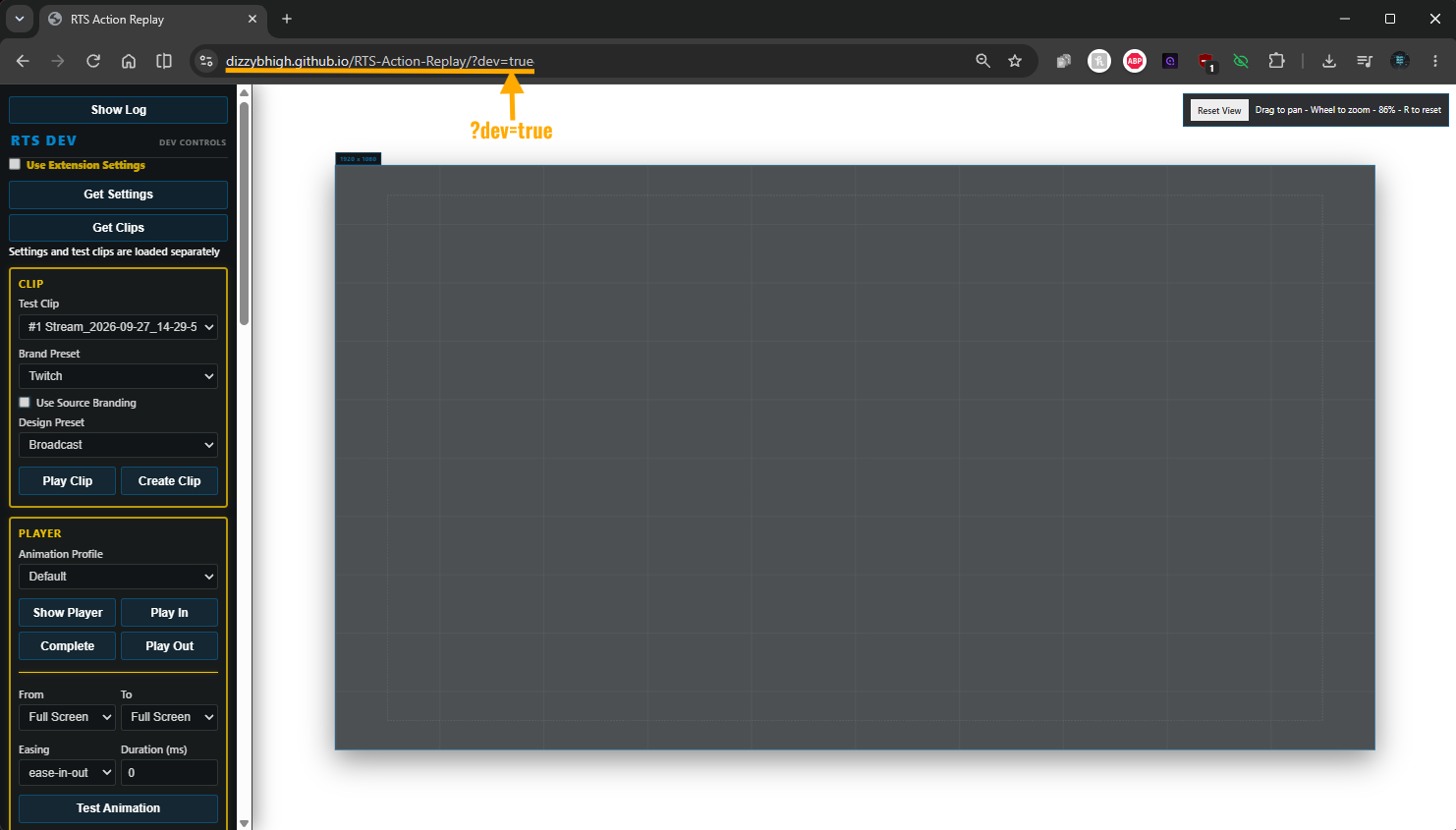
Test and set up the Extension using the overlay's built-in development mode.
Copy the [[overlay:Overlay URL]], open it in a browser, and add [[muted:?dev=true]] at the end.\n\nThis will put the overlay into dev mode, where you can test and preview the extension's features and settings.
In the Test tab of the extension's settings, you can click the Send Configuration to Overlay button. Once this is done, all the presets will be sent to the overlay and can be previewed.
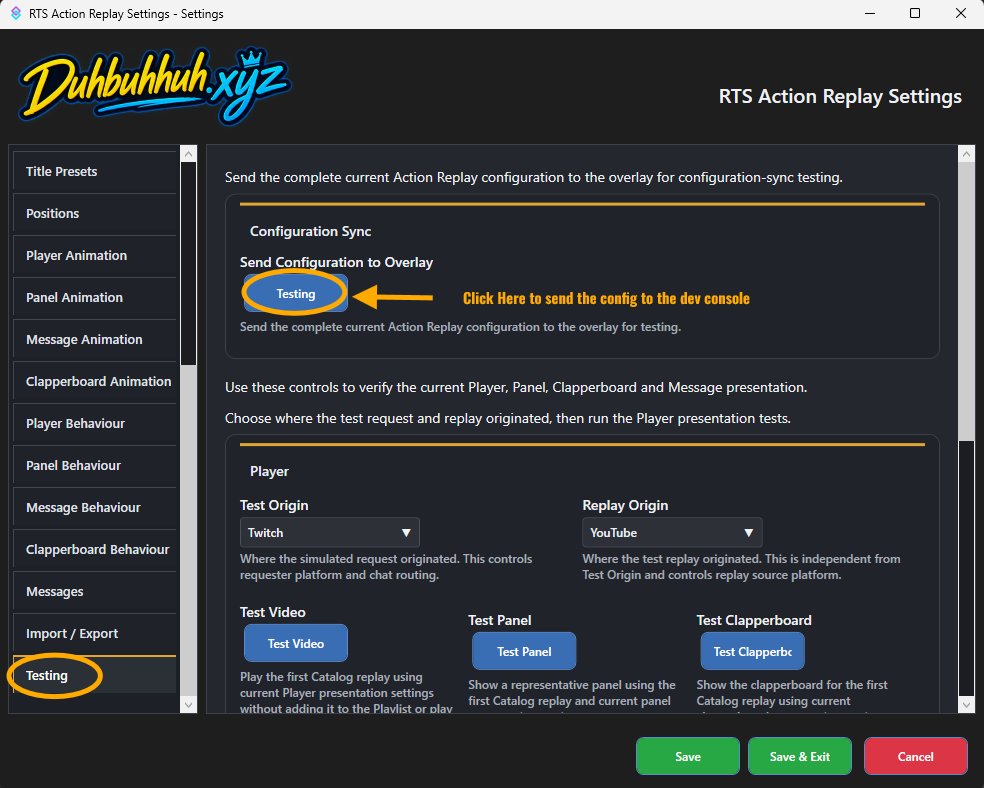
The Testing tab of the settings allows you to send various actions to the overlay so you can preview your changes easily.\n\nAfter changing an option in the test settings, click save before initiating a test.
There are a large number of settings that enable you to configure how the extension behaves and looks.\nThis documentation guide aims to walk you through what each setting does, allowing you to tailor the extension to your specific needs.
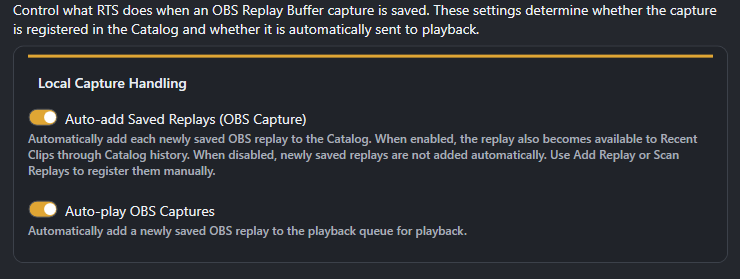
[[blue:Streamer.bot]] can be set up to watch a folder for new media.\nThis is particularly useful for OBS (or other capture/streaming software) when captures via its replay buffer are saved to a folder on your computer. [[blue:Streamer.bot]] picks this up and adds the file to the catalog.\n[[blue:Streamer.bot's]] HTTP Service maps the folder and serves the file to the overlay when requested.
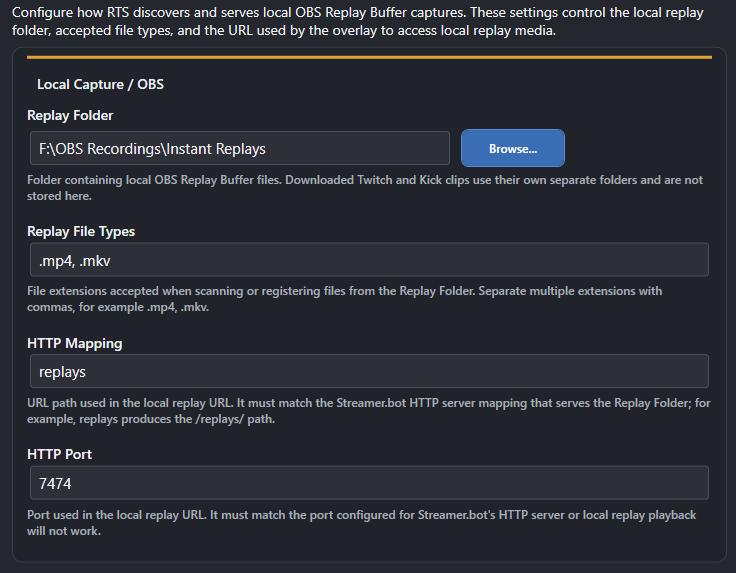
!add-existing-replay "<filename>" <title>Add one existing OBS replay file from the configured Replay Folder to the Catalog. If no title is supplied, the Replay Title Template is used. Existing Catalog entries are not added again.!scan-replay-folderScan the configured Replay Folder and add replay files that are not already in the Catalog.!savereplay | !save-replay | !clip-local | !cliplocalTell OBS to save the current Replay Buffer. What happens next depends on Replay Source and Playlist settings.%replayName%%replayDate%%replayTime%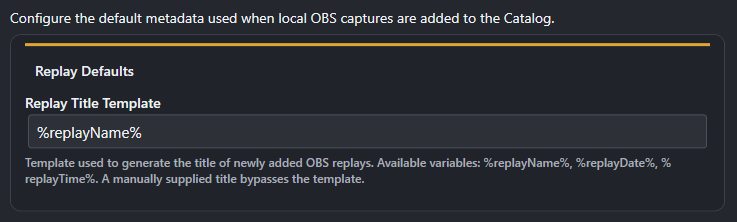
Configure how [[purple:Twitch clips]] are acquired and made available to the player.
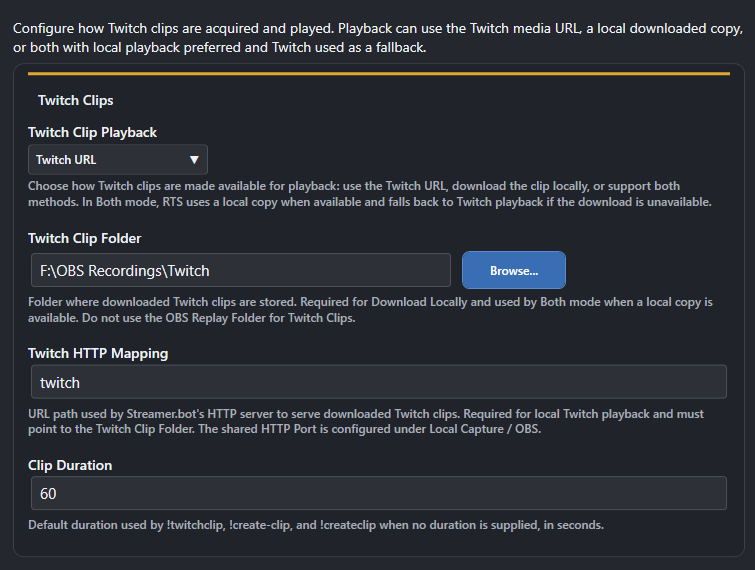
!twitch-clip [<duration>] [<title>] | !twitchclip [<duration>] [<title>] | !create-clip [<duration>] [<title>] | !createclip [<duration>] [<title>]Create a Twitch clip. Twitch chat only. Duration is 5-60 seconds.Configure timestamp-based clips from the current monitored [[red:YouTube]] broadcast.
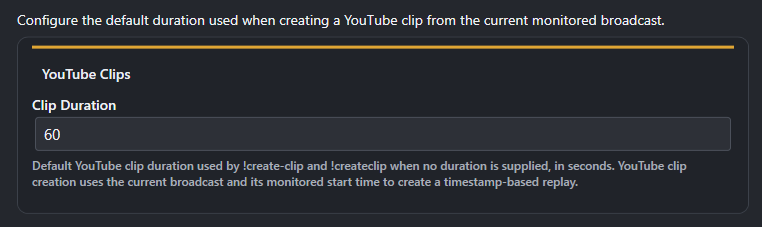
!create-clip [<duration>] [<title>] | !createclip [<duration>] [<title>]Create a timestamped clip from the current YouTube live broadcast. YouTube chat only.Configure how [[green:Kick]] clips are acquired and made available to the player.
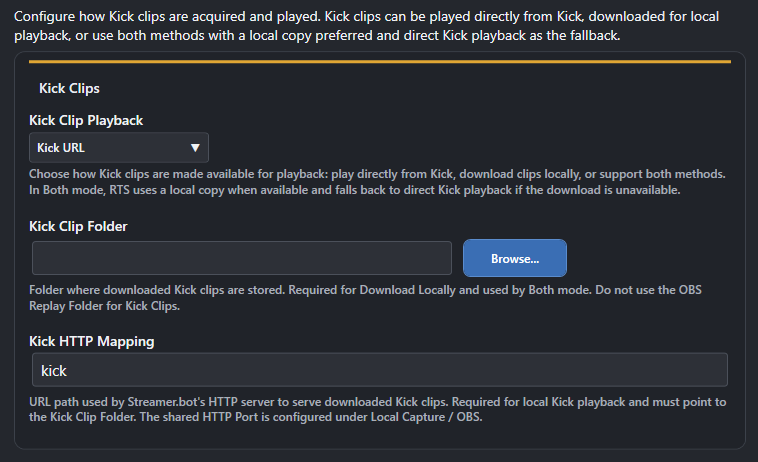
!create-clip [<duration>] [<title>] | !createclip [<duration>] [<title>]Request a Kick clip through the KickBot workflow. Kick chat only.Control how replays start and how playback controls and player styling are presented.
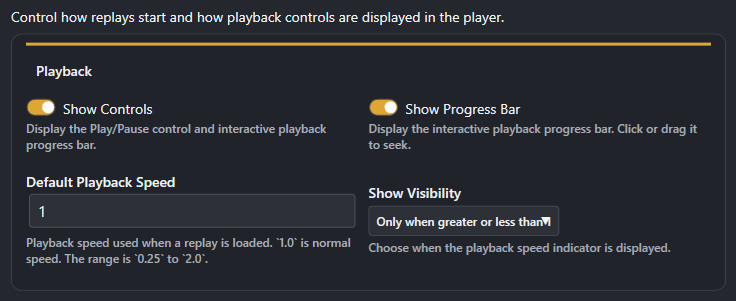
!recently-played [--amount <N>] | !last-played [--amount <N>]Show the most recently played replays.!player-pos <position tag> [<duration ms>] | !player-position <position tag> [<duration ms>]Move the player to a saved position. Use the saved position tag, not the display name.!hide-player | !player-hideHide the current player without deleting or resetting the replay.!video-pause | !player-pausePause the current video.!video-play | !player-playResume the current video.!set-speed <playback speed> | !player-speed <playback speed> | !clip-speed <playback speed>Change playback speed. Accepted range is 0.25 to 4.0.!show-player | !player-showShow the current player and resume the current video.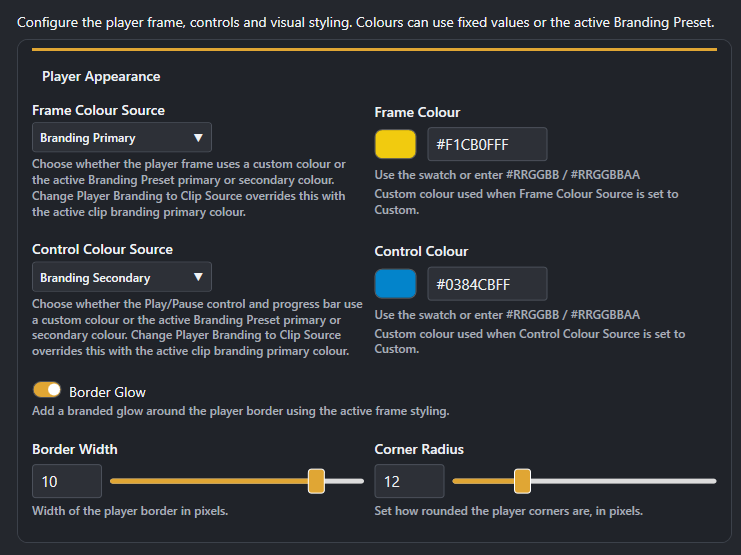
!player-pos <position tag> [<duration ms>] | !player-position <position tag> [<duration ms>]Move the player to a saved position. Use the saved position tag, not the display name.The Catalog is the persistent replay library. Recent Clips and Last Played are different views/history derived from replay data, while the Playlist is the live playback queue.
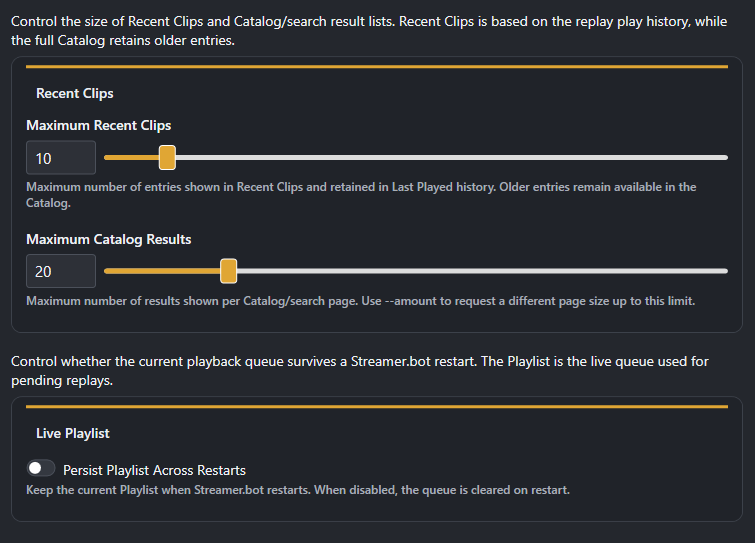
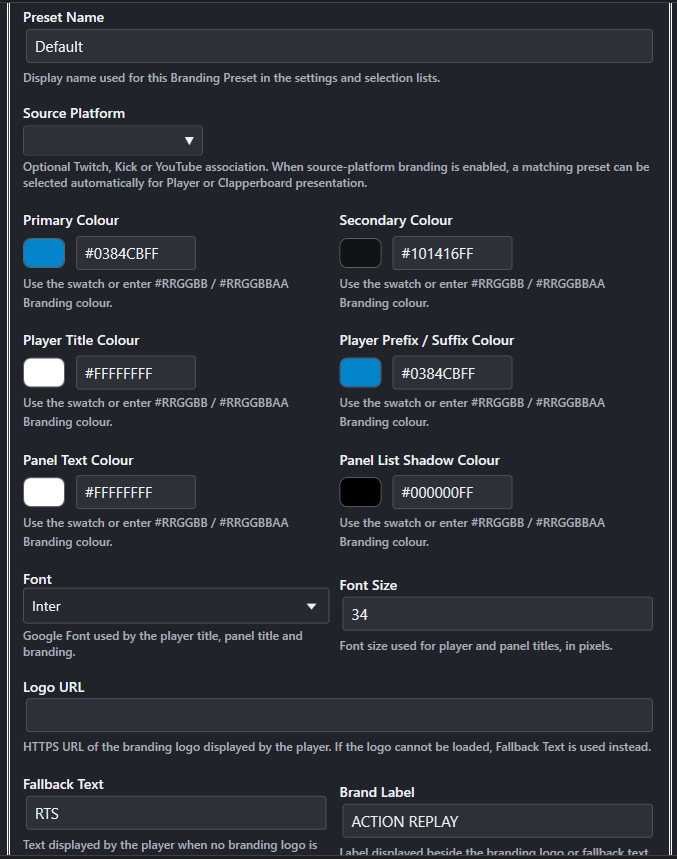
!search-recent [--amount <N>]Show recently captured or added replays. This is different from Last Played.!playlistShow the current Playlist.!play-clip <replay number> | !play-replay <replay number>Add a replay to the Playlist. A replay can be selected by Catalog/search result number, custom title, or platform and user search context.!playlist-clear | !playlistclearRemove waiting items while leaving the currently playing item alone.!playlist-clearall | !playlistclearallRemove everything from the Playlist without stopping a replay already playing.!playlist-pause | !playlistpausePause automatic Playlist progression without stopping the current video.!playlistremove <playlist item> | !playlist-remove <playlist item>Remove a waiting item by its Playlist position. The currently playing item cannot be removed.!playlistresume | !playlist-resumeResume Playlist progression. If nothing is playing and queued items exist, Resume starts the next item.Define reusable colours, typography and branding identity used by Player, Panel, Clapperboard and Message presentation.
There are 5 branding presets pre-configured: [[white:default]], [[yellow:RTS]], [[purple:Twitch]], [[red:YouTube]], and [[green:Kick]]. They can be changed, but not deleted.\nYou can create and delete extra presets as you need, and they will be available for use throughout the settings.
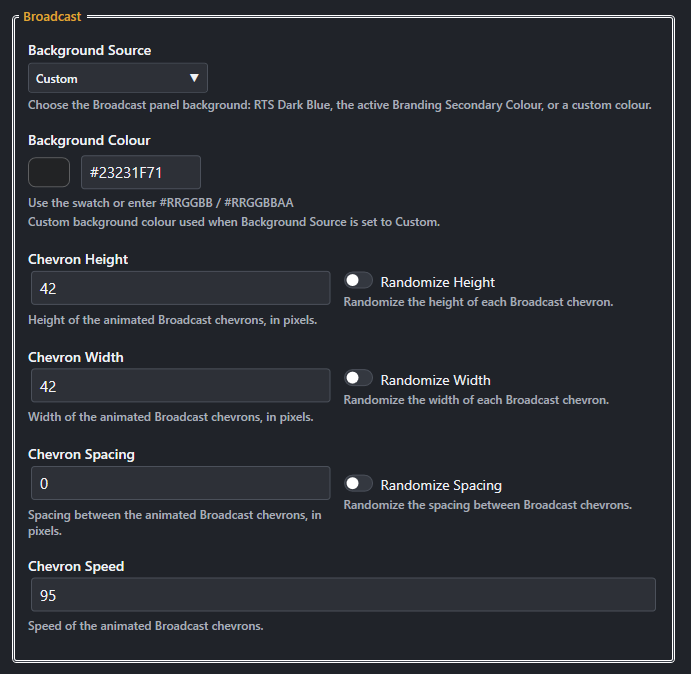
Define the visual treatment used by Player, Panel, and Message presentation.\nThere are 2 configurable presets [[yellow:Broadcast]] and [[yellow:Cut]], plus two non-configurable presets [[yellow:Cinematic]] and [[yellow:Minimal]]
Provides an animated chevron treatment.
Provides an animated block/bar treatment.
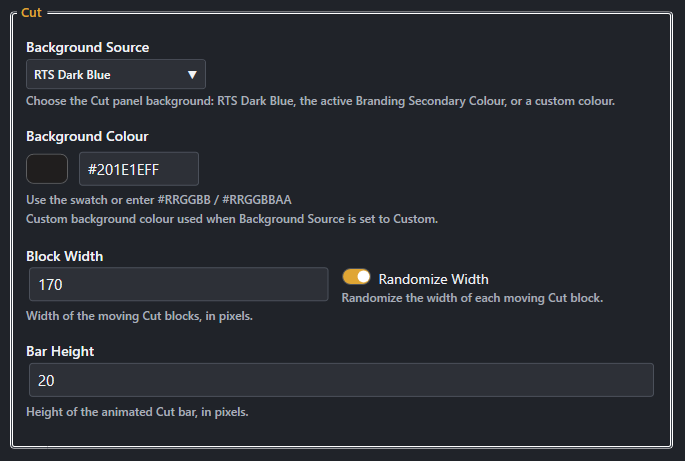
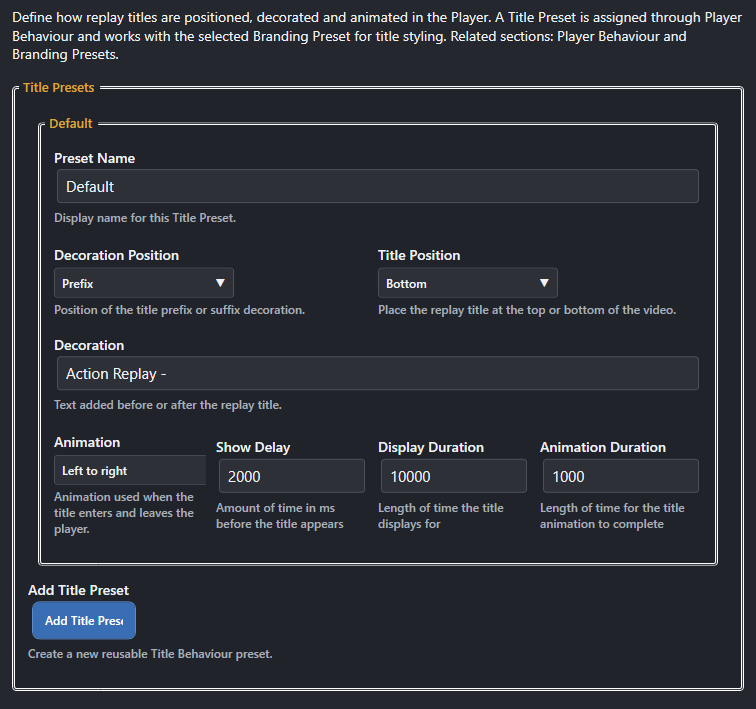
Define how replay titles are positioned, decorated, and animated in the Player. The default preset can be changed, but not deleted.\n*DO NOT RENAME THE DEFAULT PRESET!!!
Define reusable Player, Panel, Message, and Clapperboard positions in the shared 1920x1080 overlay coordinate space.
Panel and Messages can have their Width, Height, and Corner Radius set. After changing these options, save and exit settings, then reopen settings before editing the positions.\nPositions are used in animation presets for displaying the Panels/Messages.
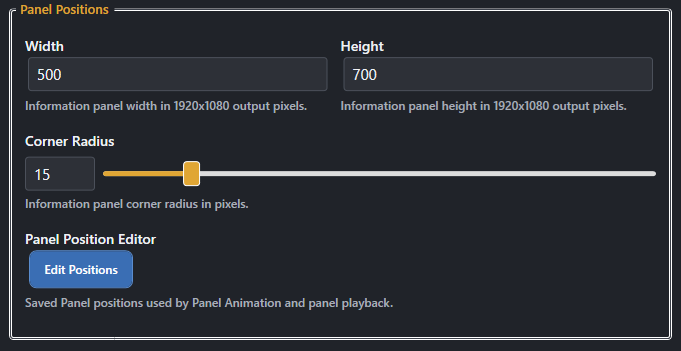
Saved positions used by Player Animation and playback.
!player-pos <position tag> [<duration ms>] | !player-position <position tag> [<duration ms>]Move the player to a saved position. Use the saved position tag, not the display name.Saved positions used by Clapperboard Animation and playback.
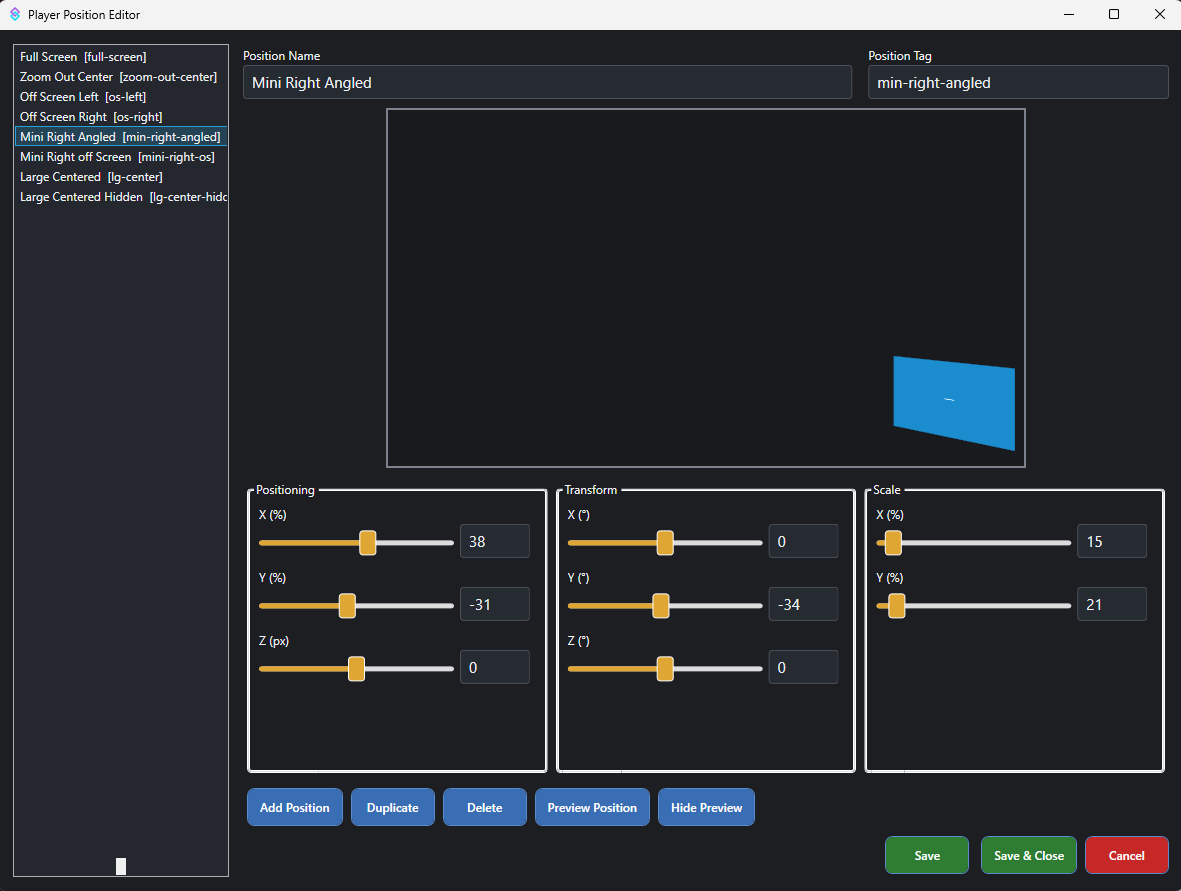
The [[yellow:RTS Position Editor]] allows you to place the Player, Panels, Messages, and Clapperboard anywhere on your display;\n you can place elements on and off screen then use the animation presets to show and hide elements however you choose.\n The position editor is based on a 16:9 resolution and works on 1080p and 1440 resolutions. All four position editors support saved transforms, including scale, X/Y/Z position, and X/Y/Z rotation. Animation Profiles reference these saved positions, so changing a saved position affects every profile that uses it.
Animation Profiles are created to allow complete configuration of how your elements appear and disappear.\nThere are 4 animation profile tabs one each for the [[yellow:Player]], [[yellow:Panel]], [[yellow:Message]] and [[yellow:Clapperboard]]. The Animation system works the same for all elements. There is a default Animation profile for each element that cannot be deleted. More presets can be created for each element as needed.
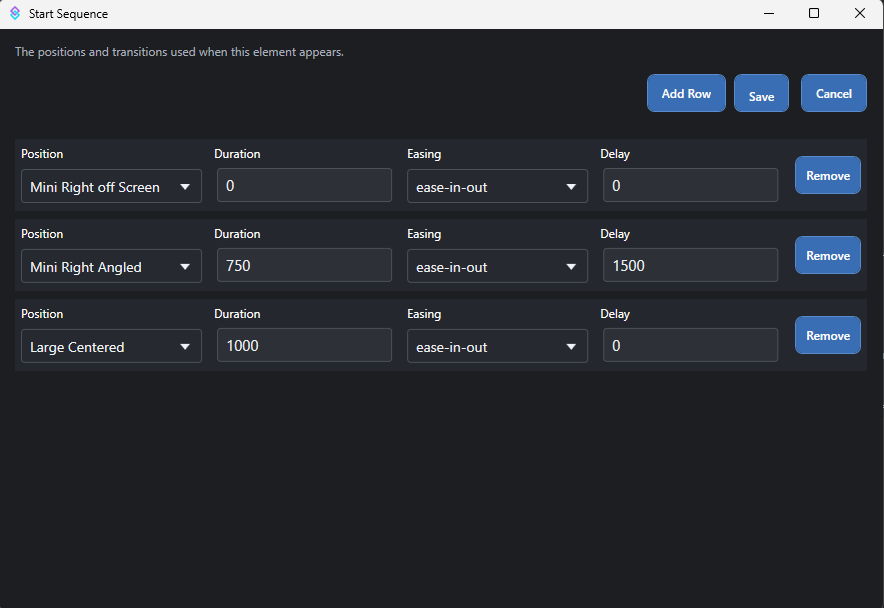
Each Animation Profile has a [[yellow:Start Sequence]] and an [[yellow:End Sequence]]. The Start Sequence determines how the element appears; the End Sequence determines how it disappears.
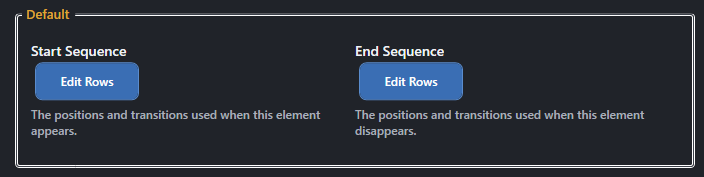
A sequence is created from 1 or more positions defined in the elements [[yellow:Position Editor]]; only the positions for the current element will be shown, i.e., player positions cannot be used in Panel Sequences
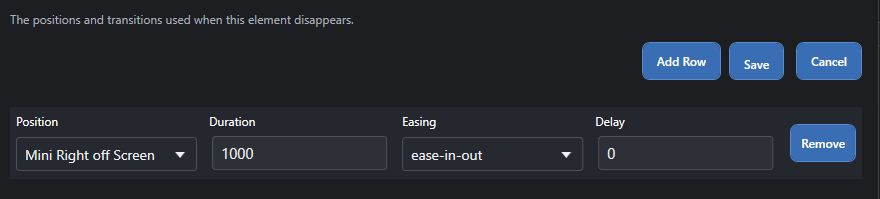
An End sequence is created from 1 or more positions defined in the elements [[yellow:Position Editor]]; only the positions for the current element will be shown, i.e., player positions cannot be used in Panel Sequences
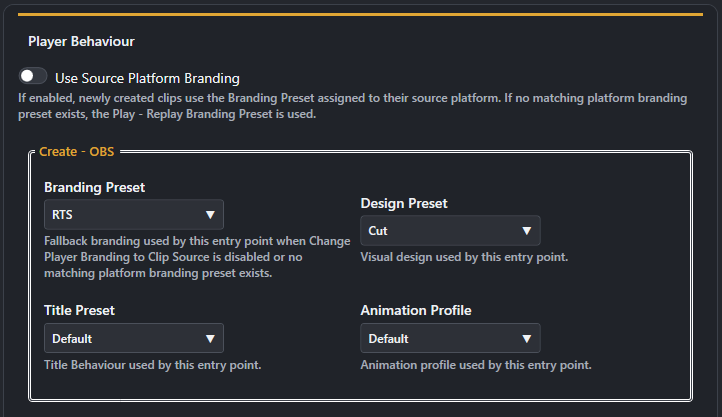
The player Behaviour tab allows you to congigure how the player looks and behaves on each platform, there are 4 Create profiles for each platform: [[blue:OBS]], [[purple:Twitch]], [[red:YouTube]], and [[green:Kick]].\nThe Create profiles determine how the player looks when a clip is created on that platform.
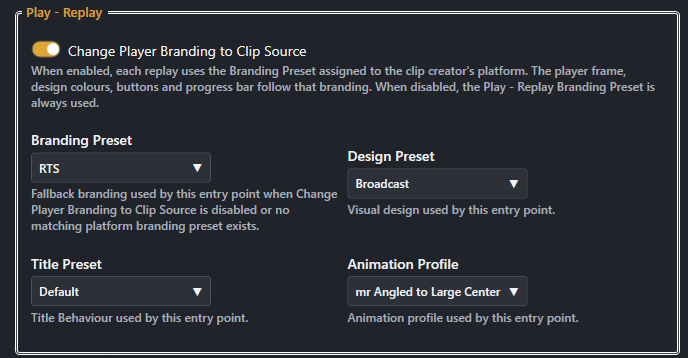
When this is on, the player will use the branding preset associated with the platform that created the clip, if a matching preset exists. Otherwise it will default to using the Branding set in the Play Replay setting (see below).\nWhen it is Off, the player will use the Branding Preset set in the Create setting for that platform.

Each platform can have its own Animation Profile, Design Preset, Title Preset, and Branding Preset.\nThe Create settings determine how the player looks when a clip is created and played from that platform.
The Play settings determine how the player looks when a clip is played from the [[yellow:Playlist]], [[yellow:Recent Clips]], or [[yellow:Last Played]].\nThe Branding Preset, Design Preset, Title Preset, and Animation Profile can be set independently of the Create settings.
The Panel Behaviour tab allows you to configure how the panels look and behave, there are several options available to customize the appearance and behavior of the panels.\n you can configure each panel type separately [[yellow:Recent/Search]], [[yellow:Playlist]] and [[yellow:Leaderboards]].
When this is selected, the recent/search will use the branding preset asscociated with the platform that the request came from.

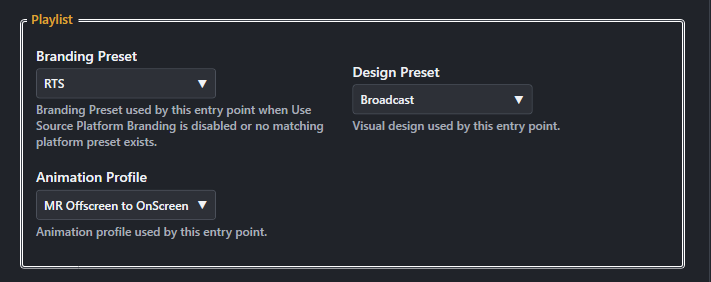
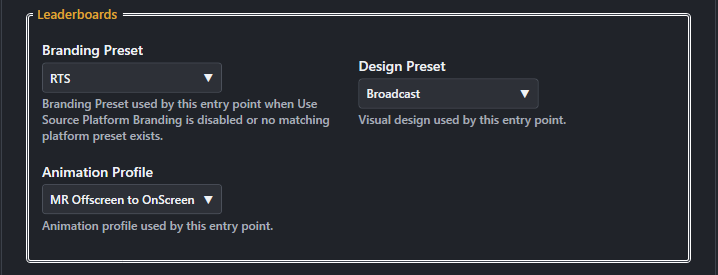
When this is selected, the panels will use the branding preset asscociated with the platform that the request came from.
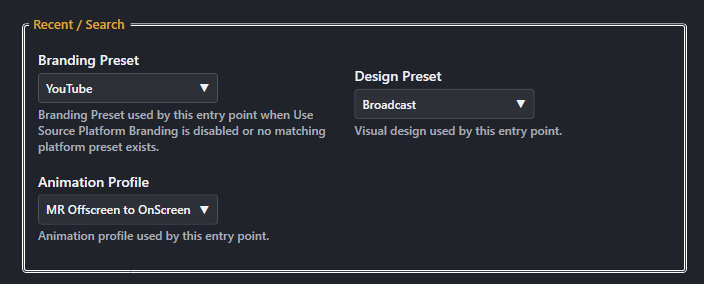
Whenever a clip is requested, captured or queued, the playlist panel will be updated to reflect the current state of the playlist.\nThe playlist panel can be configured to use a different branding preset, design preset and animation profile than the recent/search panel.
!playlistShow the current Playlist.!playlist-clear | !playlistclearRemove waiting items while leaving the currently playing item alone.!playlist-clearall | !playlistclearallRemove everything from the Playlist without stopping a replay already playing.!playlist-pause | !playlistpausePause automatic Playlist progression without stopping the current video.!playlistresume | !playlist-resumeResume Playlist progression. If nothing is playing and queued items exist, Resume starts the next item.!playlistremove <playlist item> | !playlist-remove <playlist item>Remove a waiting item by its Playlist position. The currently playing item cannot be removed.Action Replay keeps track of the most viewed clips and the creators with the most clips created.\nThe leaderboard panels can be configured to use a different branding preset, design preset and animation profile than the recent/search panel.
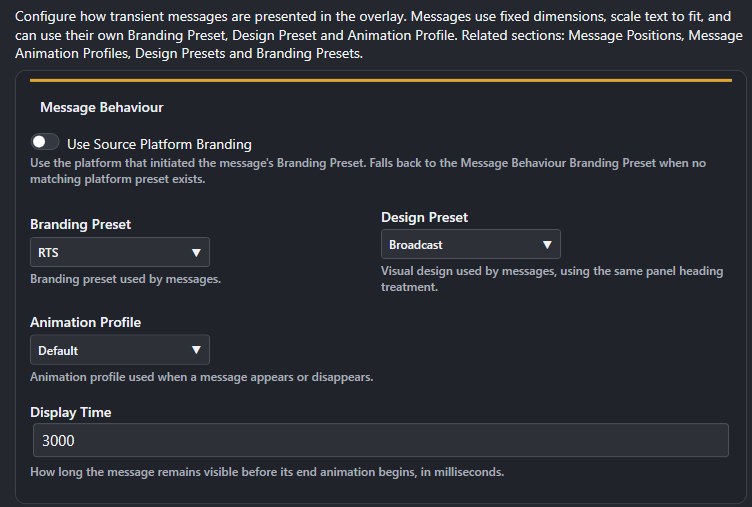
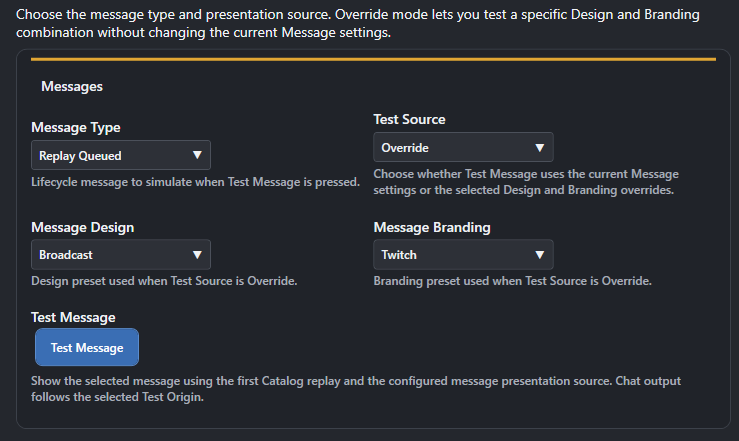
!creator-leaderboard [<period>] [--amount <N>]Show the creator leaderboard.Configure how transient messages are presented in the overlay.
When this is set the messages will use the branding of the platform the request came from.

When this is set the messages will use the default branding of the platform the request came from.
!overlay-message <message> | !rts-message <message>Send a message directly to the RTS overlay using the configured Message Behaviour.Configure the Clapperboard that is used when a new replay is created.
If selected the clapperboard will be shown when a new clip is created. If this setting is disabled, the message system will be used instead.

When this is set the Clapperboard will use the branding of the platform the clip was created on.

The animation profile used by the Clapperboard.
!savereplay | !save-replay | !clip-local | !cliplocalTell OBS to save the current Replay Buffer. What happens next depends on Replay Source and Playlist settings.!create-clip [<duration>] [<title>] | !createclip [<duration>] [<title>]Request a Kick clip through the KickBot workflow. Kick chat only.!twitch-clip [<duration>] [<title>] | !twitchclip [<duration>] [<title>] | !create-clip [<duration>] [<title>] | !createclip [<duration>] [<title>]Create a Twitch clip. Twitch chat only. Duration is 5-60 seconds.!create-clip [<duration>] [<title>] | !createclip [<duration>] [<title>]Create a timestamped clip from the current YouTube live broadcast. YouTube chat only.Control how Search, Playlist and Recent Items presented.
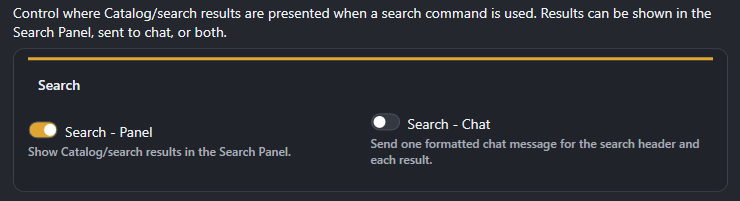
Control how search results are presented in the overlay and chat.
!search <search text> [--amount <N>]Search the Catalog by text. With no search text, returns the Catalog without a text filter.!search-creator <creator> [--amount <N>] | !creator-search <creator> [--amount <N>]Search for replays by creator.!search-date <date period> [--amount <N>] | !date-search <date period> [--amount <N>]Search for replays from a date period. Supported forms include today, this week, last week, this year, last year, year, month and month year.!search-rating [<rating>] [--amount <N>]List replays by rating. 0 is unrated; 1-4 select average rating bands 1.0-4.9; 5 selects a 5.0 average. Without a rating, rated replays are returned ordered by average rating.!search-recent [--amount <N>]Show recently captured or added replays. This is different from Last Played.!search-views [--amount <N>] | !most-views [--amount <N>]List replays ordered by playback count. Only replays with at least one recorded play are included.!creator-leaderboard [<period>] [--amount <N>]Show the creator leaderboard.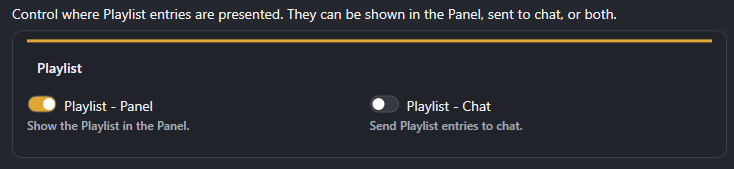
!playlistShow the current Playlist.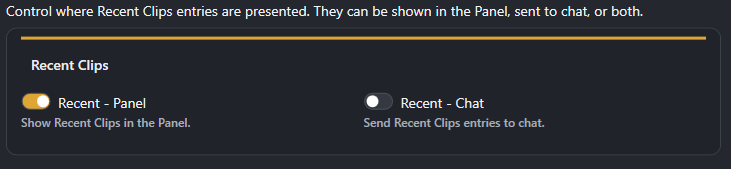
!search-recent [--amount <N>]Show recently captured or added replays. This is different from Last Played.%listNumber%%title%%creator%%rating%%platform%%plays%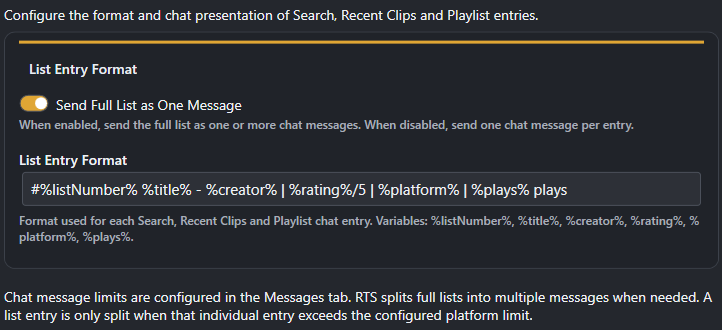
Configure message outputs for the various [[yellow:yellow:Action Replay]] events
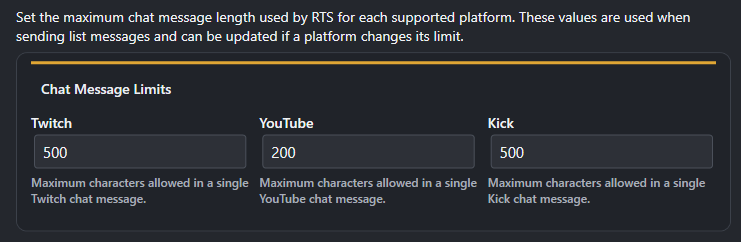
Set the platforms max character limit for chat messages.
When a replay is created this message is generated.
%replayTitle%%replayUser%%replayPlatform%%replaySourcePlatform%%requesterName%%requesterPlatform%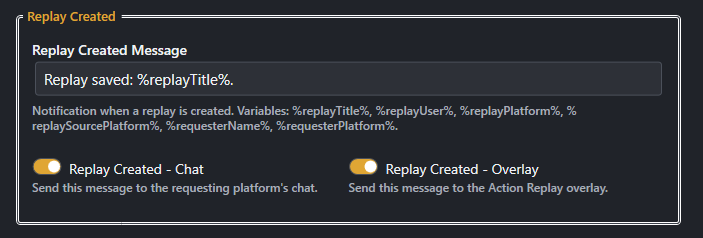
When a replay is played this message is generated.
%replayNumber%%replayTitle%%replayUser%%replayPlatform%%replaySourcePlatform%%requesterName%%requesterPlatform%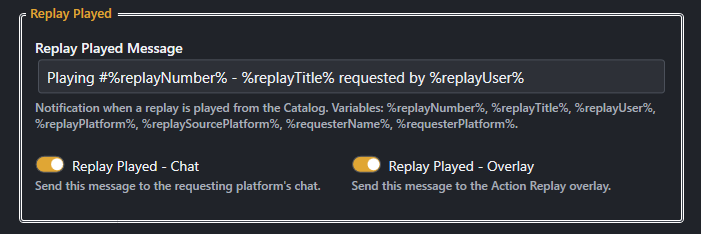
When a replay is queued this message is generated.
%replayTitle%%replayUser%%replayPlatform%%replaySourcePlatform%%requesterName%%requesterPlatform%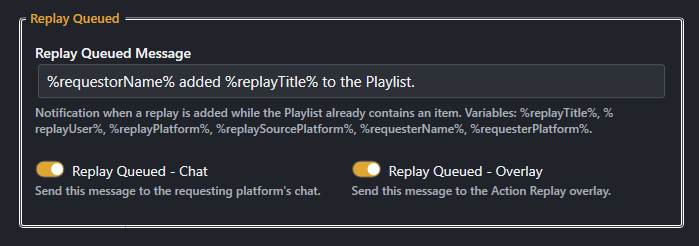
When a replay is removed from the playlist this message is generated.
%replayTitle%%requesterName%%requesterPlatform%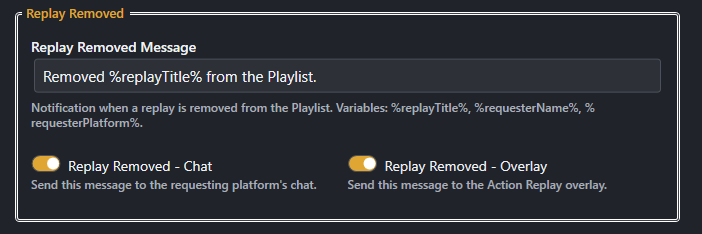
When the playlist is cleared this message is generated.
%clearedCount%%requesterName%%requesterPlatform%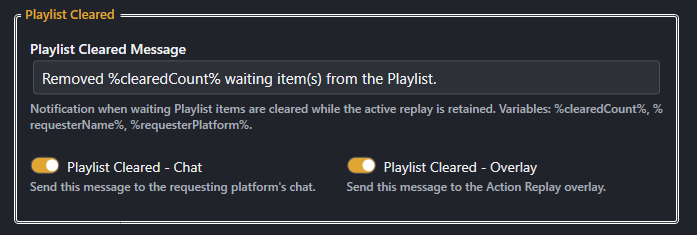
When the all items in the playlist are cleared this message is generated.
%clearedCount%%requesterName%%requesterPlatform%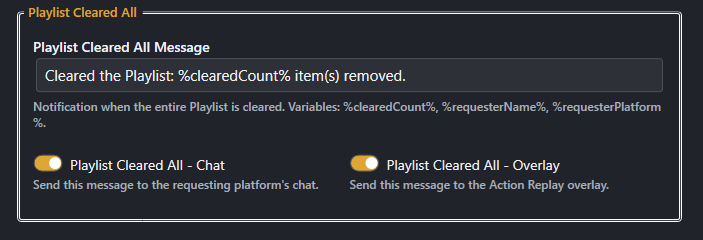
When a replay is rated this message is generated.
%replayTitle%%replayDescription%%replayRating%%averageRating%%requesterName%%requesterPlatform%
When a replay is renamed this message is generated.
%replayNumber%%oldTitle%%newTitle%%requesterName%%requesterPlatform%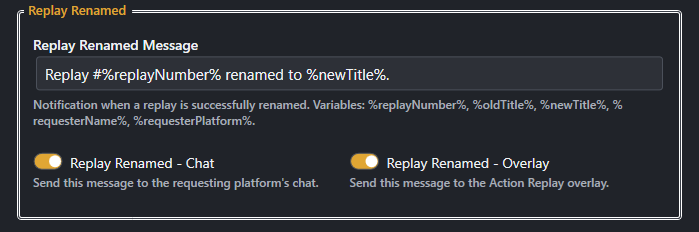
When a replay is deleted from the catalog, this message is generated.
%replayTitle%%replayUser%%replayPlatform%%replaySourcePlatform%%requesterName%%requesterPlatform%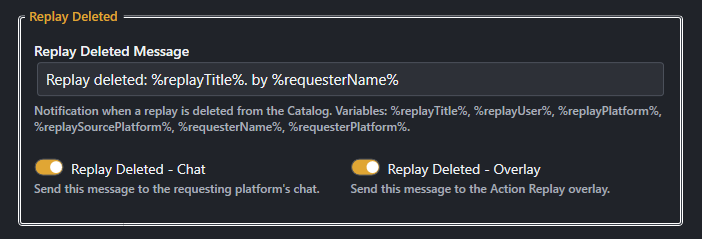
Import selected RTS Action Replay settings from a JSON file. Click Import and you will be prompted to choose a file containing the settings you want to import.
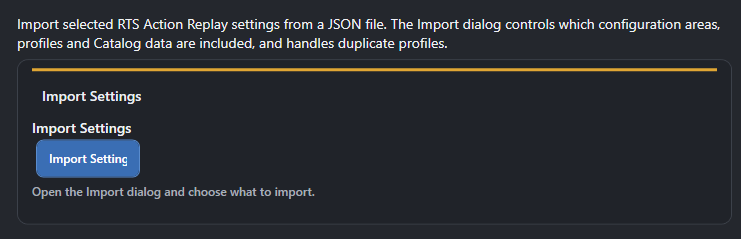
Allows you to import catalog items back into [[blue:Action Replay]]
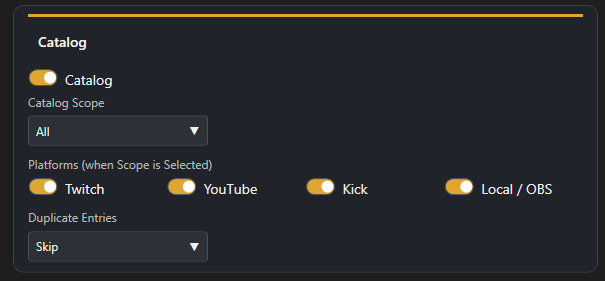
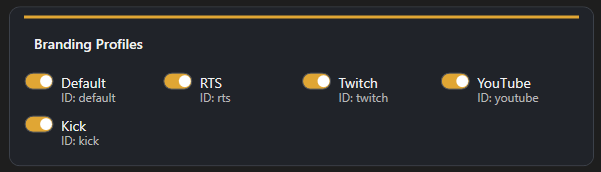
Allows you to import Branding Profiles back into [[blue:Action Replay]].\n A list of profiles contained in the export will be displayed, check the profiles you wish to import.
Allows you to import Animation Profiles back into [[blue:Action Replay]].\n A list of profiles contained in the export will be displayed, check the profiles you wish to import.
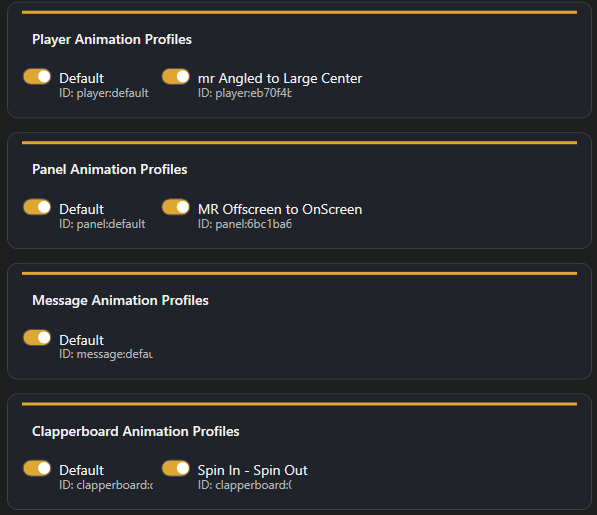
Click the Import Selected Button to import the selected data.
Restores RTS Action Replay configuration to its built-in defaults.
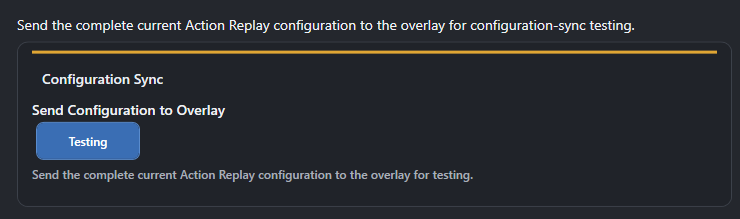
Send Configuration to Overlay sends the complete current Action Replay configuration to the overlay for testing purposes. The configuration can also be imported directly from the overlay when it is in dev mode.
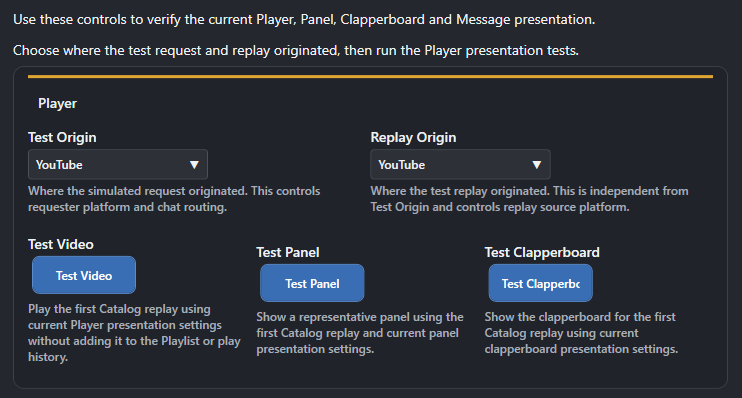
You can test the configuration for the Player, Panels and Clapper Board by clicking on the respective buttons.
Complete reference for the RTS Action Replay chat commands.
!add-existing-replay "<filename>" <title>
Add one existing OBS replay file from the configured Replay Folder to the Catalog. If no title is supplied, the Replay Title Template is used. Existing Catalog entries are not added again.
!search-creator <creator> [--amount <N>] | !creator-search <creator> [--amount <N>]
Search for replays by creator.
!search-date <date period> [--amount <N>] | !date-search <date period> [--amount <N>]
Search for replays from a date period. Supported forms include today, this week, last week, this year, last year, year, month and month year.
!delete-from-catalog <number(s)>
Delete Catalog entries from the current result set. Multiple current-page results can be supplied as comma-separated numbers. The physical media file is not deleted.
!search-first
Return to the first page of the current Catalog/search results.
!search-last
Jump to the last page of the current Catalog/search results.
!search-views [--amount <N>] | !most-views [--amount <N>]
List replays ordered by playback count. Only replays with at least one recorded play are included.
!search-next
Move to the next page of the current Catalog/search results.
!search-prev
Move to the previous page of the current Catalog/search results.
!catalog-purge
Remove Catalog entries whose replay media can no longer be resolved. It does not delete physical files.
!rate-replay <rating> | !rate-clip <rating> | !rate-video <rating>
Rate the replay currently playing. Rating is 1 to 5 and is stored per user.
!search <search text> [--amount <N>]
Search the Catalog by text. With no search text, returns the Catalog without a text filter.
!search-show
Show the current page of the current Catalog/search results.
!search-rating [<rating>] [--amount <N>]
List replays by rating. 0 is unrated; 1-4 select average rating bands 1.0-4.9; 5 selects a 5.0 average. Without a rating, rated replays are returned ordered by average rating.
!creator-leaderboard [<period>] [--amount <N>]
Show the creator leaderboard.
!name-clip <replay number> <replay title> | !rename-clip <replay number> <replay title>
Give a Catalog replay a custom title. Custom titles must be unique, ignoring case. The physical video file is not renamed.
!play-history <history item>
Play an item from the Last Played history.
!search-recent [--amount <N>]
Show recently captured or added replays. This is different from Last Played.
!scan-replay-folder
Scan the configured Replay Folder and add replay files that are not already in the Catalog.
!clip-leaderboard
Show replay playback activity.
!create-clip [<duration>] [<title>] | !createclip [<duration>] [<title>]
Request a Kick clip through the KickBot workflow. Kick chat only.
!twitch-clip [<duration>] [<title>] | !twitchclip [<duration>] [<title>] | !create-clip [<duration>] [<title>] | !createclip [<duration>] [<title>]
Create a Twitch clip. Twitch chat only. Duration is 5-60 seconds.
!create-clip [<duration>] [<title>] | !createclip [<duration>] [<title>]
Create a timestamped clip from the current YouTube live broadcast. YouTube chat only.
!savereplay | !save-replay | !clip-local | !cliplocal
Tell OBS to save the current Replay Buffer. What happens next depends on Replay Source and Playlist settings.
!overlay-message <message> | !rts-message <message>
Send a message directly to the RTS overlay using the configured Message Behaviour.
!recently-played [--amount <N>] | !last-played [--amount <N>]
Show the most recently played replays.
!player-pos <position tag> [<duration ms>] | !player-position <position tag> [<duration ms>]
Move the player to a saved position. Use the saved position tag, not the display name.
!hide-player | !player-hide
Hide the current player without deleting or resetting the replay.
!video-pause | !player-pause
Pause the current video.
!video-play | !player-play
Resume the current video.
!set-speed <playback speed> | !player-speed <playback speed> | !clip-speed <playback speed>
Change playback speed. Accepted range is 0.25 to 4.0.
!show-player | !player-show
Show the current player and resume the current video.
The Playlist is the live playback queue and is separate from the Catalog and playback history.
!playlist
Show the current Playlist.
!play-clip <replay number> | !play-replay <replay number>
Add a replay to the Playlist. A replay can be selected by Catalog/search result number, custom title, or platform and user search context.
!playlist-clear | !playlistclear
Remove waiting items while leaving the currently playing item alone.
!playlist-clearall | !playlistclearall
Remove everything from the Playlist without stopping a replay already playing.
!playlist-pause | !playlistpause
Pause automatic Playlist progression without stopping the current video.
!playlistremove <playlist item> | !playlist-remove <playlist item>
Remove a waiting item by its Playlist position. The currently playing item cannot be removed.
!playlistresume | !playlist-resume
Resume Playlist progression. If nothing is playing and queued items exist, Resume starts the next item.
Loading reviews...